
Polars meets Delta
Polars series #5 #edition26

What’s on the list today?
Polars Series, Part 5: Polars and Delta Lake integration


🐻Polars Series – Part 5: Polars + Delta Lake
Welcome back to the Polars journey! This is the 5th and final part in the 5 part series of exploring Polars as a data frame library.
Part1 - An Introduction to Polars
Part2 - Lazy Execution in Polars
Part3 - Expressions and Transformations
In the previous editions we have explored Polars streaming engine and now its time to unlock the much awaited Delta lake integration.
🤔 Why Delta Lake?
For the unversed Delta lake is an open-source table format extends Apache Parquet with a transaction log, providing ACID (Atomicity, Consistency, Isolation, Durability) transactions, schema enforcement, and versioning. Essentially, it turns a data lake into a more robust and manageable data lakehouse.
Polars with the power of delta-rs library supports a direct integration with delta lake API.
💬 Why this matters?
Delta Lake initially developed by Databricks in the Spark ecosystem was later open-sourced. While Spark was built for large-scale distributed computing, the definition of “big data” continues to evolve — thanks to powerful single-node tools, much of today’s workloads no longer require a distributed engine.
Delta Lake remains a widely adopted storage format, but its tight coupling with Spark wasn’t ideal for lightweight use cases — leading to the rise of projects like delta-rs and other standalone libraries that decouple Delta from the Spark ecosystem.
Spark limitations
High startup time due to JVM initialisations, scheduling
Resource heavy even for small tasks
Serialisation costs to move data between nodes
Polars already addressed these problems
Runs instantly - no JVM, no cluster
Written in Rust - memory efficient
In memory processing with zero-copy
Combining this with the power of a Delta lake makes this solution whole.
🏗️ The Setup
You will need to install the deltalake library for this one. If you are following along with me on the github repo you would just need to run uv sync to install the libraries needed for this to work.
Creating/Writing Delta Table
import polars as pl

data = {
    'product_code' : ['0001', '0002', '0003', '0004'],
    'color' : ['red', 'green','blue','yellow'],
    'size': ['small','medium','large','x-large']
}

df = pl.DataFrame(data).with_columns(
    [
        pl.lit(True).alias('is_current'),
    ]
)
print(df)
table_path = "src/data/deltalake/product"
df.write_delta(table_path,mode='append')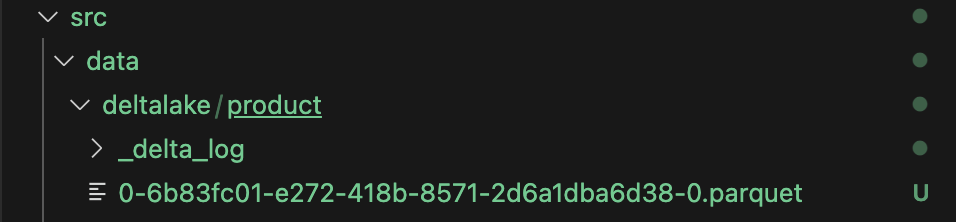
There you go, plain and simple. Within seconds you have a delta table, thats how it should be. No spark dependencies, and no wrestling with arbitrary jar files.
Reading Delta Table
table_path = "src/data/deltalake/product"
df = pl.read_delta(table_path)
print(df)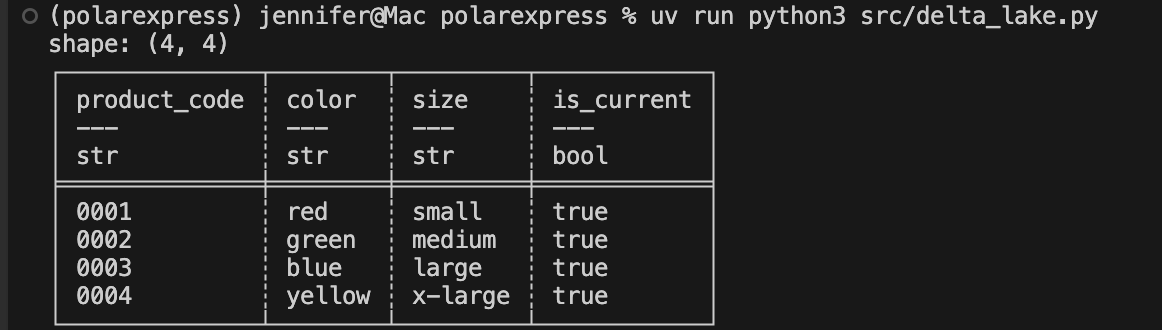
Again, plain and simple!
Advanced Delta Operations
If you work with Delta lake on a daily basis you know that there is more to it than just reading and writing data. Delta lake offers features like time-travel, transaction history, optimize for file compaction and vacuum for managing file/data retention.
Although Polars does not natively offer this, you can combine Polars with deltalake library to get these as well.
Describe History of Delta table
import polars as pl
from deltalake import DeltaTable

table_path = "src/data/deltalake/product"
dt = DeltaTable(table_path)
hist = pl.DataFrame(dt.history())
print(hist)
The history shows us the history of transactions and other interesting metadata that we can explore. Its a very useful tool to inspect operations on a table.
Optimize
Optimize on delta table essentially compacts small files and rewrites the data into bigger parquet files.
dt = DeltaTable(table_path)
dt.optimize.compact()
You can also track this operation in the history of the table.
VACUUM
Vacuum on delta lake manages the data retention and deletes data that are beyond the retention limit. The default is 7 days.
dt = DeltaTable(table_path)
dt.vacuum()
print(dt.vacuum())
The caveat here is that by default vacuum only does a dry_run and prints the list of files that will be deleted to avoid accidental deletes. In order to actually execute the operation you must explicitly set dry_run=False
dt.vacuum(dry_run=False)In our case it just prints an empty list because the files were just created and are within the default retention range which is 7 days.
Conclusion
We're wrapping up the Polars series with a big milestone - delta lake integration. This is a game-changer because it's what brings Polars into your main workflow. It's not done yet, but it's getting popular fast, and we're excited for the features that are still on the way.
Thanks for checking out part-5 of the series. The example code is available on Github.
Want more content like this? Give it a share and hit that subscribe button. Let us know what you think in the comments.